


By using this site, you agree to the Privacy Policy and Terms of Use.
Accept
Sparktopus Blog
Wednesday, Dec 24, 2025
  • What's Hot:
  • Business Growth
  • Website Development
  • AI Automation
  • Video Ads
  • Home
  • Latest
  • Free Courses
    Free CoursesShow More
    Woman smiling while learning AI automation on a laptop
    7 Shockingly Valuable Free Courses Every Beginner Should Take (AI & Automation Edition)
    December 18, 2025
    A person happily studying online on a laptop, representing learning from free courses.
    7 Free Online Courses That Skyrocket Your Skills in 2025
    November 26, 2025
    11 Free AI Courses That Come With Certificates
    11 Free AI Courses That Come With Certificates
    November 21, 2025
  • AI Automation
    AI AutomationShow More
    Professionals using AI dashboards and automation tools to improve business efficiency.
    7 AI Automation Hacks That Transform Business Efficiency
    November 26, 2025
    Professionals collaborating in a modern office using IT dashboards and digital tools for business growth.
    Smarter IT Solutions to Accelerate Business Growth
    November 26, 2025
    Business team reviewing AI automation errors on digital dashboards.
    5 Costly AI Automation Mistakes Slowing Your Success
    November 21, 2025
    “Team reviewing AI automation dashboards with digital charts and workflow visuals.”
    7 Powerful AI Automation Tricks Transforming Business Growth
    November 21, 2025
    Business owners losing productivity due to lack of AI automation tools
    5 Costly Mistakes Businesses Make Without AI Automation
    November 21, 2025
  • App Development
    App DevelopmentShow More
    A smiling woman using a mobile app on her smartphone, representing a smooth and user-friendly app experience.
    5 Deadly App Development Mistakes Ruining User Experience
    November 26, 2025
    Small business owner reviewing a new mobile app design with developers in a modern office, showing shopping features and customer engagement tools in 2025.
    Want More Customers? Get a High-Converting Mobile App in 2025
    November 21, 2025
    Business team reviewing poor app performance data, symbolizing costly mistakes businesses must avoid.
    7 Costly App Mistakes Every Business Must Avoid
    November 21, 2025
    Entrepreneurs reviewing mobile app growth data with digital charts and devices, symbolizing smart app tips for business success.
    10 Smart App Tips to Skyrocket Your Business Growth
    November 21, 2025
    Business team reviewing mobile app sales data on digital devices with growth charts, symbolizing proven app strategies to boost sales fast.
    5 Proven App Strategies to Boost Sales Fast
    November 21, 2025
  • Website Development
    Website DevelopmentShow More
    7 Website Design Agencies Dominating 2026 (Global Ranking)
    7 Website Design Agencies Dominating 2026 (Global Ranking)
    December 21, 2025
    A team reviewing an upgraded website interface on a laptop, showing improved design and positive growth analytics.
    10 Proven Website Upgrades to Boost Growth
    November 21, 2025
    A team of web designers analyzing a modern website layout to improve design and sales performance.
    7 Powerful Website Design Tips That Drive Sales
    November 21, 2025
    A comparison of a cluttered website design and a clean high-converting layout on a laptop screen, highlighting common web design mistakes
    5 Costly Web Design Mistakes Killing Conversions
    November 21, 2025
    Frustrated business owner and web team analyzing a website’s poor conversion performance in a modern office setting.
    10 Costly Website Mistakes Killing Your Conversions
    November 21, 2025
  • More
    • Cloud Services
    • Cybersecurity
    • Digital Marketing
    • Graphic Design
    • Monetization
    • Search Engine Optimization
    • Video Ads
    • Prompt
Reading: 5 Costly Web Design Mistakes Killing Conversions
Contact Us
Font ResizerAa
Sparktopus BlogSparktopus Blog
  • Home
  • Latest
  • AI Automation
  • Website Development
  • App Development
  • Digital Marketing
  • Search Engine Optimization
  • Graphic Design
  • Video Ads
  • Monetization
  • Cybersecurity
  • Cloud Services
Search
  • Home
  • Latest
  • Privacy Policy
  • About Us
  • Advertise with us
  • Contact
  • Newsletter
  • Sitemap
  • Terms of Service

Trending →

100 AI Tools Taking Over in 2026 (Don’t Get Left Behind)

By Sparktopus Blog
December 18, 2025

7 Shockingly Valuable Free Courses Every Beginner Should Take (AI & Automation Edition)

By Oluwaferanmi Omidiji
December 18, 2025

7 Website Design Agencies Dominating 2026 (Global Ranking)

By Sparktopus Blog
December 21, 2025
Follow US
© Foxiz News Network. Ruby Design Company. All Rights Reserved.
Home » Latest » 5 Costly Web Design Mistakes Killing Conversions
Website Development

5 Costly Web Design Mistakes Killing Conversions

Last updated: November 21, 2025 11:01 pm
By Oluwaferanmi Omidiji
161 Views
Share
6 Min Read
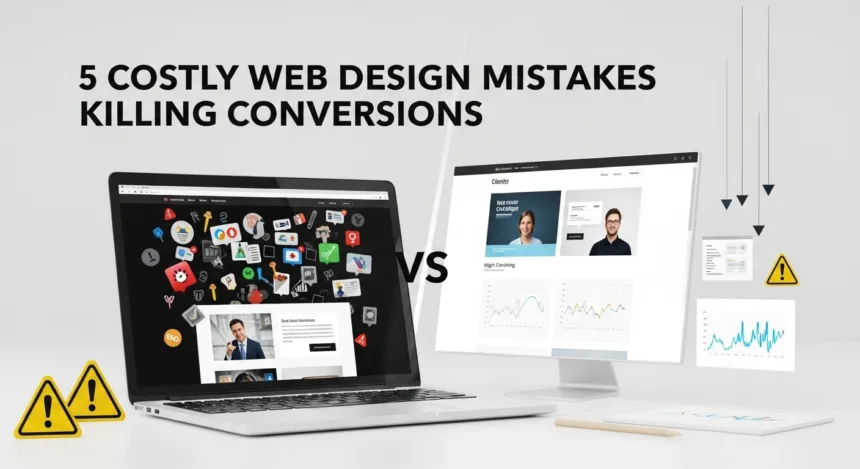
A comparison of a cluttered website design and a clean high-converting layout on a laptop screen, highlighting common web design mistakes
Cluttered design vs. clean layout — a visual look at costly web design mistakes that hurt conversions.
SHARE

In today’s digital world, your website is more than an online brochure. It is your salesperson, your brand reputation, your trust engine, and your conversion machine. But many businesses unknowingly sabotage their growth with simple, avoidable web design mistakes.

Contents
  • ✅ 1. Confusing Layouts That Overwhelm Visitors
    • Why this kills conversions
    • The fix
  • ✅ 2. Slow Loading Speed That Chases Customers Away
    • Why this kills conversions
    • The fix
  • ✅ 3. Weak or Unclear Call-to-Action Buttons
    • Why this kills conversions
    • The fix
  • ✅ 4. Poor Mobile Experience (The Silent Conversion Killer)
    • Why this kills conversions
    • The fix
  • ✅ 5. Not Building Trust With Social Proof & Branding
    • Why this kills conversions
    • The fix
    • 👉 Book a Website Revamp or Full Web Design Service With Sparktopus Today

The good news? Fixing these issues can instantly boost user trust, session duration, sign-ups, and sales — without needing a full redesign.

Let’s break down the 5 most costly web design mistakes killing your conversions and how to avoid them like a pro.                                 You may also like to read: 7 Proven Web Development Secrets for Business Growth

✅ 1. Confusing Layouts That Overwhelm Visitors

A surprising number of business owners try to pack too much into their homepage — sliders, flashing banners, paragraphs of text, and random buttons.

- Advertisement -

But here’s the truth:

If a visitor can’t understand what you offer in 5 seconds, they will leave.

A cluttered layout increases bounce rates and destroys your conversion flow.

Why this kills conversions

  • Visitors feel stressed and leave quickly

  • They don’t know where to click

  • They lose trust because the site “feels unprofessional”

  • Decision-making becomes harder, not easier

The fix

Simplify your above-the-fold section:

  • Clear headline

  • Short value proposition

  • A single CTA (Book Now, Get Started, Learn More)

Simple design boosts clarity — and clarity boosts sales.

✅ 2. Slow Loading Speed That Chases Customers Away

People are impatient — and online customers are even more impatient.

- Advertisement -

Studies show:

Every extra 1 second of load time drops conversions by 7%.

If your website takes longer than 3 seconds, people abandon it instantly.

Why this kills conversions

  • You lose customers before the page even loads

  • Slow sites feel outdated and untrustworthy

  • Google ranks slow websites lower

  • Ad campaigns become more expensive because users bounce quickly

The fix

Speed optimization isn’t about technical jargon. It’s about improving user experience:

- Advertisement -
  • Compress images

  • Use modern hosting

  • Remove heavy scripts

  • Enable browser caching

A fast website = more conversions, more sales, more happy customers.

✅ 3. Weak or Unclear Call-to-Action Buttons

Even a stunning website won’t convert if your CTA is unclear.

Many businesses make these mistakes:

  • Hiding the CTA below the fold

  • Using vague text like “Submit”

  • Using low-contrast colors

  • Not repeating the CTA throughout the page

Your CTA should guide users like a GPS, telling them the exact next step.

Why this kills conversions

  • Users don’t know what action to take

  • Low visual emphasis = low clicks

  • Confusing wording reduces confidence

  • Missed opportunities for sales or sign-ups

The fix

Use CTAs that:

  • Stand out visually

  • Are repeated multiple times

  • Use persuasive, benefit-driven text like:

    • Book Your Consultation

    • Start Your Free Trial

    • Grow Your Business Today

Small changes to CTA design can increase conversions by 30–70%.

✅ 4. Poor Mobile Experience (The Silent Conversion Killer)

Over 70% of website visitors come from mobile devices, yet many business owners design their website only for large screens.

If your site looks great on desktop but broken on mobile, you are losing a massive amount of money.

Why this kills conversions

  • Buttons too small

  • Text too tiny

  • Elements overlapping on the screen

  • Slow loading on mobile

  • Hard-to-fill forms

A non-mobile-optimized design makes your brand feel outdated and frustrates visitors.

The fix

Your website must be:

  • Mobile-friendly

  • Touch-friendly

  • Easy to scroll

  • Simple to navigate

A smooth mobile experience can double your conversion rate overnight.

✅ 5. Not Building Trust With Social Proof & Branding

People don’t buy from businesses they don’t trust.

Many websites focus so much on visuals that they forget the biggest conversion booster: credibility.

A lack of trust signals leads to:

  • Hesitation

  • Abandoned carts

  • Reduced inquiries

  • Lower brand authority

Why this kills conversions

  • Visitors doubt whether your business is legit

  • They fear being scammed

  • They question the product or service quality

  • They prefer competitors who appear more trustworthy

The fix

Add trust elements like:

  • Testimonials

  • Client logos

  • Case studies

  • Certifications

  • Clear contact information

  • About Us section with real human faces

Trust isn’t optional — it’s essential for conversions.

✅ How Many of These Mistakes Are You Making Right Now?

Most business owners unknowingly struggle with at least 3 out of the 5 mistakes listed above.

And fixing them can:

  • Increase conversions

  • Reduce bounce rates

  • Improve customer trust

  • Boost sales

  • Strengthen your brand identity

  • Improve your Google ranking

  • Lower your advertising costs

You don’t need a full redesign — you need a smart design approach.

✅ Ready to Eliminate These Costly Mistakes? Sparktopus Can Help.

If you want:
✅ A high-converting website
✅ Professional branding
✅ Better user experience
✅ More leads and sales
✅ Fewer abandoned visitors
✅ A business website that truly works

…then your next step is simple.

👉 Book a Website Revamp or Full Web Design Service With Sparktopus Today

Let the experts handle the strategies that turn clicks into customers and visitors into buyers.

Your website shouldn’t just look good.
It should sell

Oluwaferanmi Omidiji

Oluwaferanmi Omidiji is a writer at Sparktopus Blog, exploring marketing and technology.

TAGGED:Business GrowthConversion TipsWeb Design
Share This Article
Facebook Copy Link

Trending Posts

Entrepreneurs analyzing affiliate marketing dashboards with digital charts and growth visuals in a modern office, symbolizing top affiliate networks in 2025.
Top 10 Affiliate Networks Every Marketer Should Join in 2025
Digital Marketing
ChatGPT and Grok AI logos side by side in a futuristic digital interface, symbolizing an AI tools comparison in 2025
ChatGPT vs Grok: Which AI Wins in 2025?
AI Automation
Marketers in a modern workspace collaborating on laptops and screens showing SEO dashboards, keyword research charts, and analytics reports.
Top 10 SEO Tools Every Marketer Needs in 2025
Search Engine Optimization
Publishers reviewing ad revenue dashboards with futuristic digital advertising visuals in 2025
Top 10 Ad Networks for Publishers in 2025
Digital Marketing
A creative designer’s workspace with a laptop, color palette, typography samples, and branding materials — representing modern graphic design for business growth.
10 Stunning Design Secrets Every Business Must Know
Graphic Design

RSS RSS Feed

  • 7 Powerful Graphic Design Hacks That Boost Engagement
  • 7 Hidden Monetization Strategies That Boost Revenue Fast
  • 7 Powerful Cloud Services Transforming Business Operations
  • 7 Free Online Courses That Skyrocket Your Skills in 2025
  • 5 Deadly App Development Mistakes Ruining User Experience


You Might Also Like ↷

Modern workspace with a laptop displaying clean website design, symbolizing smart website design tips to win more clients.

10 Smart Website Design Tips to Win More Clients

November 21, 2025
Video Ads That Sell – Transform Your Business in 2025

Video Ads That Sell – Transform Your Business in 2025

November 21, 2025
Creative design team developing custom brand graphics for businesses in 2025 inside a modern design studio.

Want More Customers? Boost Your Brand with Custom Graphics in 2025

November 21, 2025
Marketing team creating high-converting video ads using AI tools to boost sales and engagement in 2025.

Video Ads That Sell – Transform Your Business in 2025

November 21, 2025
  • About Us
  • Advertise with us
  • Newsletter
  • Sitemap
  • Terms of Service
  • Privacy Policy

Sparktopus Blog provides expert insights on marketing, digital strategy, AI automation, web and app development, and technology solutions. Learn how to grow your business, optimize processes, and leverage modern tools effectively, with practical tips and strategies from Sparktopus.

Sparktopus Blog
  • AI Automation
  • App Development
  • Cloud Services
  • Cybersecurity
  • Digital Marketing
  • Graphic Design
  • Monetization
  • Search Engine Optimization
  • Video Ads
  • Website Development
FacebookLike
XFollow
InstagramFollow
YoutubeSubscribe
TiktokFollow
WhatsAppFollow

© 2025 Sparktopus Blog. All Rights Reserved.

Designed & Developed by Sparktopus.

adbanner
Welcome Back!

Sign in to your account

Username or Email Address
Password

New: Instant Back/Forward Navigation

When you opt to “Remember Me”, WordPress will tell your browser to save the state of pages when you navigate away from them. This allows them to be restored instantly when you use the back and forward buttons in your browser.

Lost your password?