

By using this site, you agree to the Privacy Policy and Terms of Use.
Accept
Sparktopus Blog
Monday, Aug 10, 2026
  • What's Hot:
  • AI
  • Business Growth
  • Website Development
  • Home
  • Latest
  • Technology
    • AI Automation
    • AI
    • App Development
    • Cloud Services
    • Cybersecurity
    • Search Engine Optimization
    • Domains
      • Configuration and management
    • Hosting
      • VPS
        • Pre-installed applications
    • Tech News
  • Business
    • Marketing
    • Sales
    • Monetization
    • Personal brand
    • Communication
    • Digital Marketing
    • Productivity
  • Website
    • Website Design
    • Website Development
  • Creative & Media
    • Graphic Design
    • Video Ads
    • Prompt
  • Learning
    • Free Courses
  • Make money online
Reading: How to Set Up a Welcome Email That Actually Converts
Advertise
Latest
Top 10 3D Software for Beginners in 2026
Adobe Photoshop 2026 Download Guide
CINEMA 4D Studio 2026 Download Guide
CorelDRAW Graphics Suite 2026 Download Guide
10 Best 3D Animation & VFX Software in 2026
Font ResizerAa
Sparktopus BlogSparktopus Blog
  • Home
  • Latest
  • Tech News
  • Technology
  • Business
  • Marketing
  • Sales
  • Monetization
  • AI Automation
  • Website Development
  • App Development
  • Digital Marketing
  • Search Engine Optimization
  • Graphic Design
  • Video Ads
  • Cybersecurity
  • Cloud Services
Search
  • Home
  • Latest
  • Advertise with us
  • About Us
  • Contact
  • Newsletter
  • Sitemap
  • Terms of Service
  • Privacy Policy

Trending →

7 Proven AI Automation Hacks to Skyrocket Your Business

By MrSparktopus
11 months ago

5 Powerful Ways to Protect Your Business from Hackers

By MrSparktopus
11 months ago

10 Proven Design Tips to Boost Your Business Success

By MrSparktopus
11 months ago

5 Powerful Cloud Services Every Business Must Use

By MrSparktopus
11 months ago

10 Smart Digital Marketing Tips to Boost Business Growth

By MrSparktopus
11 months ago
Follow US
© 2026 Sparktopus Blog. All Rights Reserved.

- Advertisement -

Home » Latest » How to Set Up a Welcome Email That Actually Converts
Email

How to Set Up a Welcome Email That Actually Converts

Emmanuel Masebinu - Sparktopus CEO
Last updated: June 10, 2026 7:34 am
By MrSparktopus
Share
5 Min Read
How to Set Up a Welcome Email That Actually Converts
SHARE
Contents
  • Why Welcome Emails Matter
  • Start With a Strong Subject Line
  • Introduce Your Brand Clearly
  • Deliver Value Right Away
  • Include One Clear Call to Action
  • Make It Personal
  • Optimize for Mobile Devices
  • Consider a Welcome Email Sequence
    • Email 1: Welcome
    • Email 2: Education
    • Email 3: Trust Building
    • Email 4: Offer
  • Track and Improve Performance
  • Create Better Welcome Emails With Expert Support

Many businesses spend time and money getting new email subscribers, but then make a critical mistake. They send a weak welcome email or fail to send one at all.

A welcome email is often the first direct interaction between your brand and a subscriber. It sets expectations, builds trust, and can significantly improve email conversion rates.

When done correctly, a welcome email can generate more engagement and sales than many other email marketing campaigns.
Why Welcome Emails Matter

People are most interested in your brand right after they subscribe. This is when they are paying attention and expecting to hear from you.

A strong welcome email helps you:

  • Introduce your brand
  • Build trust quickly
  • Increase email engagement
  • Drive traffic to your website
  • Encourage purchases or signups
  • Set expectations for future emails

The first email often creates a lasting impression, so it needs to deliver value immediately.

Start With a Strong Subject Line

Your subject line determines whether subscribers open your email.

Keep it simple, clear, and relevant.

Examples include:

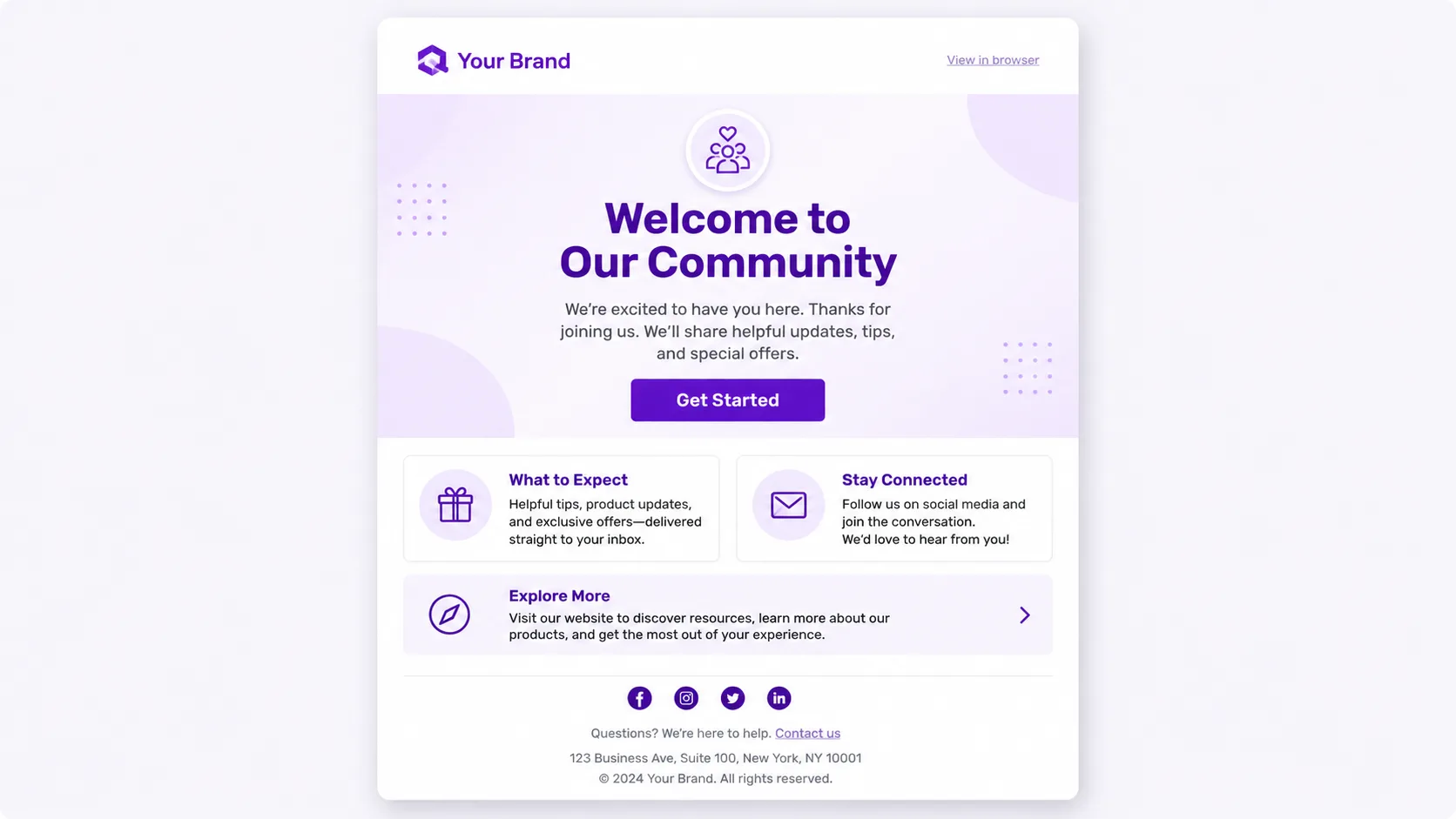
  • Welcome to Our Community
  • You’re In! Here’s What Happens Next
  • Thanks for Joining Us
  • Let’s Get Started

Avoid misleading subject lines. The goal is to build trust, not tricks.

Introduce Your Brand Clearly

New subscribers should immediately understand who you are and what you do.

Briefly explain:

  • Your mission
  • What products or services you offer
  • How you help customers
  • What subscribers can expect from your emails

Keep this section short and easy to read.

Deliver Value Right Away

One of the biggest mistakes in email marketing is focusing only on selling.

Instead, provide something useful from the start.

Examples include:

  • A helpful guide
  • A free resource
  • A discount code
  • Educational content
  • Popular blog articles
  • A quick tutorial

Giving value first increases trust and encourages future engagement.

Include One Clear Call to Action

Many welcome emails fail because they ask subscribers to do too many things.

Choose one primary action.

For example:

  • Read a blog post
  • Download a resource
  • Browse your products
  • Book a consultation
  • Create an account

A single clear call to action often performs better than several competing options.

Make It Personal

Personalization can improve email conversion rates.

Simple tactics include:

  • Using the subscriber’s first name
  • Referencing how they joined your list
  • Tailoring recommendations to their interests

People are more likely to engage when the email feels relevant to them.

Optimize for Mobile Devices

Most subscribers read emails on smartphones.

Make sure your welcome email:

  • Uses short paragraphs
  • Has easy-to-read fonts
  • Includes clear buttons
  • Loads quickly
  • Looks good on mobile screens

A mobile-friendly email creates a better user experience and improves engagement.

Consider a Welcome Email Sequence

Instead of sending only one email, many successful businesses use a welcome email sequence.

A simple sequence might include:

Email 1: Welcome

Introduce your brand and provide immediate value.

Email 2: Education

Share helpful tips, resources, or success stories.

Email 3: Trust Building

Highlight customer testimonials, case studies, or achievements.

Email 4: Offer

Present a product, service, or special promotion.

This approach gradually builds trust before asking for a sale.

Track and Improve Performance

Monitor key email marketing metrics such as:

  • Open rates
  • Click-through rates
  • Conversion rates
  • Unsubscribe rates

Testing different subject lines, calls to action, and email content can help improve results over time.

Create Better Welcome Emails With Expert Support

A welcome email is more than just a greeting. It is an opportunity to turn subscribers into loyal customers. By delivering value, building trust, and guiding readers toward a clear action, you can create a welcome email that actually converts.

If you need help building high-converting email marketing campaigns, automation systems, or customer engagement strategies, Sparktopus can help. Contact Sparktopus today and start turning new subscribers into long-term customers.


Emmanuel Masebinu - Sparktopus CEO
MrSparktopus

CEO & Founder of Sparktopus, Inc.

- Advertisement -

Share This Article
Facebook Copy Link
Previous Article How to Buy a Domain Name Forever Without Losing It
Next Article How to Launch a Social Media Marketing Agency & Get Clients How to Launch a Social Media Marketing Agency & Get Clients

Latest Posts

Top 10 3D Software for Beginners in 2026
1 day ago
Adobe Photoshop 2026 Download Guide
1 day ago
CINEMA 4D Studio 2026 Download Guide
1 day ago
CorelDRAW Graphics Suite 2026 free trial
CorelDRAW Graphics Suite 2026 Download Guide
1 day ago
10 Best 3D Animation & VFX Software in 2026
2 days ago
9 Best AI Ecommerce Builders to Boost Sales
2 days ago
12 Best AI App Builders You Should Try in 2026
2 days ago
12 Best AI Logo Generators for Fast Branding
2 days ago
9 Best AI Video Editing Tools That Save Time
2 days ago
7 AI Image Generators That Create Stunning Art
2 days ago

You Might Also Like ↷

How to Connect Website Email to Gmail in Minutes

How to Connect Website Email to Gmail in Minutes

Email
1 month ago
What Is Email Hosting (And How to Choose the Right Provider)

What Is Email Hosting? (And How to Choose the Right Provider)

Email
2 months ago
10 Email Design Best Practices for Maximum Engagement

10 Email Design Best Practices for Maximum Engagement

Email
2 months ago
SPF, DKIM, DMARC How to Stop Spam and Secure Your Inbox

SPF, DKIM, DMARC: How to Stop Spam and Secure Your Inbox

Email
2 months ago
- Advertisement -
  • Advertise with us
  • About Us
  • Contact
  • Newsletter
  • Sitemap
  • Corrections Policy
  • Diversity Policy
  • Diversity Staffing Report
  • Editorial Principles
  • Ethics Policy
  • Feedback Policy
  • Ownership & Funding
  • Terms of Service
  • Privacy Policy

Sparktopus Blog is your go-to source for insights on AI, technology, business, cybersecurity, digital marketing, websites, monetization, productivity, and more. Discover practical guides, industry news, expert strategies, and innovative ideas designed to help businesses, creators, and entrepreneurs grow in the digital world.

Sparktopus Blog Logo
  • AI Automation
  • App Development
  • Cloud Services
  • Cybersecurity
  • Digital Marketing
  • Free Courses
  • Graphic Design
  • Monetization
  • Search Engine Optimization
  • Video Ads
  • Website Development
FacebookLike
XFollow
InstagramFollow
YoutubeSubscribe
TiktokFollow
WhatsAppFollow

© 2026 Sparktopus Blog. All Rights Reserved.

Designed & Developed by Sparktopus.

Welcome Back!

Sign in to your account

Username or Email Address
Password

New: Instant Back/Forward Navigation

When you opt to “Remember Me”, WordPress will tell your browser to save the state of pages when you navigate away from them. This allows them to be restored instantly when you use the back and forward buttons in your browser.

Lost your password?