

By using this site, you agree to the Privacy Policy and Terms of Use.
Accept
Sparktopus Blog
Friday, Jun 26, 2026
  • What's Hot:
  • Business Growth
  • AI
  • Website Development
  • Home
  • Latest
  • Technology
    • AI Automation
    • AI
    • App Development
    • Cloud Services
    • Cybersecurity
    • Search Engine Optimization
    • Domains
      • Configuration and management
    • Hosting
      • VPS
        • Pre-installed applications
    • Tech News
  • Business
    • Marketing
    • Sales
    • Monetization
    • Personal brand
    • Communication
    • Digital Marketing
    • Productivity
  • Website
    • Website Design
    • Website Development
  • Creative & Media
    • Graphic Design
    • Video Ads
    • Prompt
  • Learning
    • Free Courses
  • Make money online
Reading: How to Remove Watermarks from Images with ChatGPT
Advertise
Latest
How to Remove Watermarks from Images with ChatGPT
12 AI Productivity Tools That Will Save You Hours
n8n Performance Benchmark, See How Fast It Really Is
7 Best Content Creation Equipment for Beginners
How to Make Money on Twitch (Even If You’re Starting From $0)
Font ResizerAa
Sparktopus BlogSparktopus Blog
  • Home
  • Latest
  • Tech News
  • Technology
  • Business
  • Marketing
  • Sales
  • Monetization
  • AI Automation
  • Website Development
  • App Development
  • Digital Marketing
  • Search Engine Optimization
  • Graphic Design
  • Video Ads
  • Cybersecurity
  • Cloud Services
Search
  • Home
  • Latest
  • Advertise with us
  • About Us
  • Contact
  • Newsletter
  • Sitemap
  • Terms of Service
  • Privacy Policy

Trending →

How Much Does Email Marketing Cost? (Full Breakdown)

By MrSparktopus
2 months ago

How to Remove Watermarks from Images with ChatGPT

By MrSparktopus
2 hours ago

5 Costly App Mistakes Every Business Must Avoid

By MrSparktopus
10 months ago

10 Proven Design Tips to Boost Your Business Success

By MrSparktopus
10 months ago

5 Powerful Cloud Services Every Business Must Use

By MrSparktopus
10 months ago
Follow US
© 2026 Sparktopus Blog. All Rights Reserved.

- Advertisement -

Home » Latest » How to Remove Watermarks from Images with ChatGPT
AI

How to Remove Watermarks from Images with ChatGPT

Emmanuel Masebinu - Sparktopus CEO
Last updated: June 26, 2026 4:27 pm
By MrSparktopus
Share
5 Min Read
How to Remove Watermarks from Images with ChatGPT
SHARE
Contents
Why Use ChatGPT for Watermark Removal?The Prompt to UseStep 1: Open ChatGPTStep 2: Paste the PromptStep 3: Upload Your ImageStep 4: Submit the RequestStep 5: Review the ResultStep 6: Download the Edited ImageTips for Better ResultsWhen This Method Is AppropriateKey Takeaways

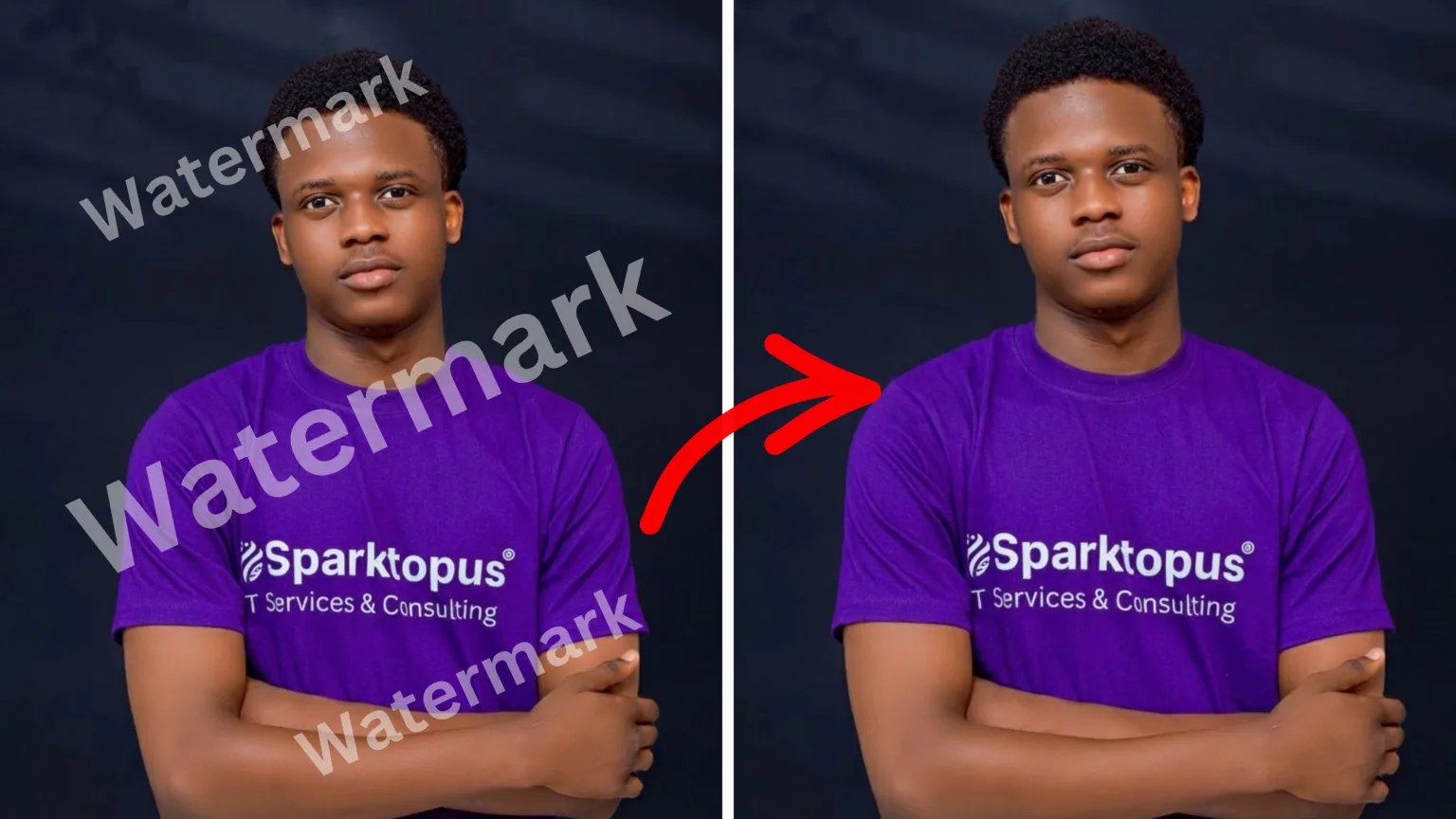
Removing unwanted overlays from an image has become easier with AI-powered editing tools. If you have permission to edit an image or own the rights to it, ChatGPT can help reconstruct areas covered by watermarks or other unwanted elements while preserving the original quality.

Why Use ChatGPT for Watermark Removal?

ChatGPT’s image editing capabilities can intelligently rebuild parts of an image after removing an authorized watermark or overlay. Instead of simply blurring or cropping the affected area, it attempts to recreate textures, colors, and details so the final result looks natural.

This makes it useful for cleaning up your own images, restoring old graphics, or removing accidental text overlays.

The Prompt to Use

Copy and paste the following prompt into ChatGPT, then upload the image you are authorized to edit:

Edit the attached image by removing only the watermark or unwanted overlay that I am authorized to remove.

Preserve the original image details, composition, lighting, colors, texture, sharpness, aspect ratio, and resolution. Reconstruct the covered area naturally so it blends with the surrounding pixels. Do not crop, stretch, blur, distort, or change the main subject.

Maintain high quality and keep the final image clean, realistic, and visually consistent with the original. Do not add new objects, text, logos, or effects.

Step 1: Open ChatGPT

Go to ChatGPT and start a new conversation that supports image uploads and editing.

Step 2: Paste the Prompt

Copy the prompt above and paste it into the message box before uploading your image. This gives ChatGPT clear instructions on how you want the image edited.

Step 3: Upload Your Image

Attach the image that contains the watermark or unwanted overlay you have permission to remove.

Wait for the upload to complete before sending the request.

Step 4: Submit the Request

Send the prompt along with the uploaded image.

ChatGPT will analyze the image and generate an edited version that attempts to remove only the specified overlay while preserving the rest of the picture.

Step 5: Review the Result

Once processing is complete, inspect the edited image carefully.

Check that:

  • The watermark or overlay has been removed.
  • The reconstructed area blends naturally with nearby pixels.
  • The lighting, colors, and textures remain consistent.
  • The main subject of the image has not been altered.

If necessary, you can refine the prompt and try again.

Step 6: Download the Edited Image

If you are satisfied with the result, use ChatGPT’s download or export option to save the edited version to your device.

You can then use the image for your authorized purposes.

Tips for Better Results

To achieve the highest-quality output:

  • Upload the highest-resolution image available.
  • Use a clear and specific prompt.
  • Avoid heavily compressed source images.
  • Review the final image for any reconstruction artifacts.
  • Keep backup copies of the original file.

When This Method Is Appropriate

AI-based watermark removal can be useful when:

  • You own the original image.
  • You accidentally added a watermark or overlay yourself.
  • You have explicit permission from the copyright holder to remove it.
  • You are cleaning up graphics for internal or authorized use.

Always respect copyright laws and licensing agreements when editing images.

Key Takeaways

ChatGPT provides a convenient way to remove authorized watermarks and unwanted overlays while preserving image quality. By using a detailed prompt and supplying a high-quality source image, you can often produce clean, natural-looking results in just a few minutes.

The most important rule is to use this capability responsibly and only on images you own or have permission to modify.

Important: Only remove watermarks or overlays from images that you own or that you are legally authorized to modify. Do not use this method to bypass copyright protections or licensing requirements for stock photos or other protected content.

Emmanuel Masebinu - Sparktopus CEO
MrSparktopus

CEO & Founder of Sparktopus, Inc.

- Advertisement -

Share This Article
Facebook Copy Link
Previous Article 12 AI Productivity Tools That Will Save You Hours 12 AI Productivity Tools That Will Save You Hours

Latest Posts

12 AI Productivity Tools That Will Save You Hours
21 hours ago
n8n Performance Benchmark, See How Fast It Really Is
1 week ago
7 Best Content Creation Equipment for Beginners
1 week ago
How to Make Money on Twitch (Even If You’re Starting From $0)
2 weeks ago
How to Improve Your Ecommerce Conversion Rate
2 weeks ago
SPF, DKIM, DMARC How to Stop Spam and Secure Your Inbox
SPF, DKIM, DMARC: How to Stop Spam and Secure Your Inbox
2 weeks ago
How to Use Claude AI Beginner Full Guide
How to Use Claude AI: Beginner Full Guide
2 weeks ago
Best anti detection browsers 2026
12 Best Anti-Detection Browsers to Use in 2026
2 weeks ago
Which OS Is Best for Docker Maximize Speed & Stability.
Which OS Is Best for Docker? Maximize Speed & Stability
2 weeks ago
AI app development tools
Replit vs. Lovable: Which Is Better for Your Projects?
2 weeks ago

You Might Also Like ↷

7 Best ChatGPT Alternatives That Actually Work

7 Best ChatGPT Alternatives That Actually Work

AI
3 months ago
Can AI Make PowerPoint Slides That Look Pro

Can AI Make PowerPoint Slides That Look Pro

AI
3 months ago
How to Make Cinematic AI Videos Without Editing Skills

How to Make Cinematic AI Videos Without Editing Skills

AI
3 weeks ago
Claude AI Prompts to 10x Your Productivity

Claude AI Prompts to 10x Your Productivity

AI
3 weeks ago
- Advertisement -
  • Advertise with us
  • About Us
  • Contact
  • Newsletter
  • Sitemap
  • Corrections Policy
  • Diversity Policy
  • Diversity Staffing Report
  • Editorial Principles
  • Ethics Policy
  • Feedback Policy
  • Ownership & Funding
  • Terms of Service
  • Privacy Policy

Sparktopus Blog is your go-to source for insights on AI, technology, business, cybersecurity, digital marketing, websites, monetization, productivity, and more. Discover practical guides, industry news, expert strategies, and innovative ideas designed to help businesses, creators, and entrepreneurs grow in the digital world.

Sparktopus Blog Logo
  • AI Automation
  • App Development
  • Cloud Services
  • Cybersecurity
  • Digital Marketing
  • Free Courses
  • Graphic Design
  • Monetization
  • Search Engine Optimization
  • Video Ads
  • Website Development
FacebookLike
XFollow
InstagramFollow
YoutubeSubscribe
TiktokFollow
WhatsAppFollow

© 2026 Sparktopus Blog. All Rights Reserved.

Designed & Developed by Sparktopus.

Welcome Back!

Sign in to your account

Username or Email Address
Password

Lost your password?